Friday, December 20, 2013

HOW TO USE TUNNEL GURU WITH YOUR VODACOM LINE.
Requirements
Read How to get started with TunnelGuru before this
1.Java Runtime enviroment which you can Download http://filehippo.com/search?q=Java
or java offline installation download it here javadl.sun.com/webapps/download/AutoDL?BundleId=81819 (for 32 bit computer) or
javadl.sun.com/webapps/download/AutoDL?BundleId=81821 (for 64 bit computers)
2.Tunnel Guru client http://www.mediafire.com/download/g2ksl0l9d0d0m0l/TG%20new%20HTTP%20confidential.rar
3.Username and Password http://www.tunnelguru.com/registration.php
Try to check in your email SPAM FOLDER or INBOX folder for username and password
5.http://tunnelguru.com/tz/set.php
IF You have all these then proceed here below
1.Register for username and password on requirement 3 link
2.Download new TG client from requirement 2
3.Install WinRAR if it not present in your pc(requirement 4)
4.Use WinRAR to unzip/Extract TGv.2.6.0.0.zip
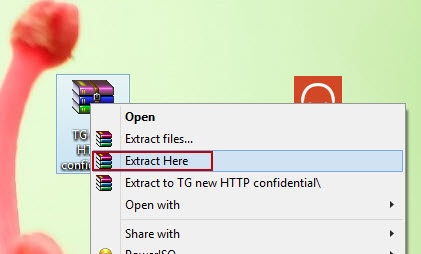
If no idea on how to unzip look on this image
5.Open the folder and Run TunnelGuru client

6.Fill the credentials as shown below
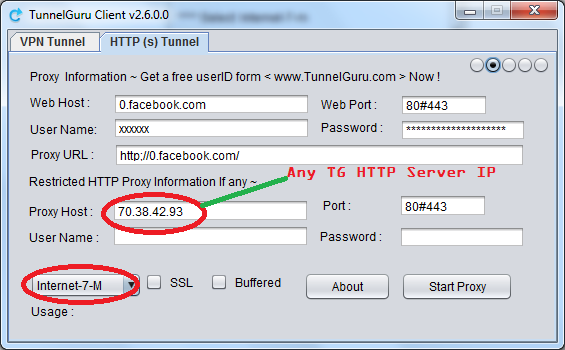
Any TG HTTP server can be found here http://tunnelguru.com/serverlist.php
1.Fungua TG client yako afu fuatisha picha
baada ya hapo endelea kama ifuatavyo
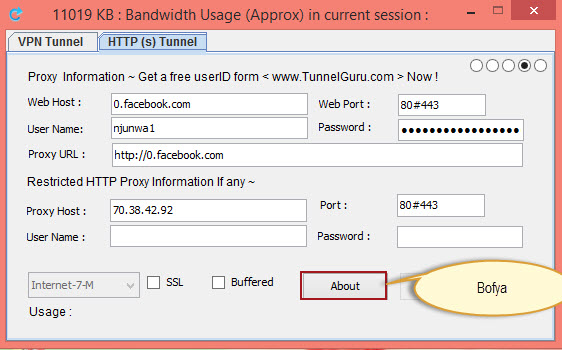
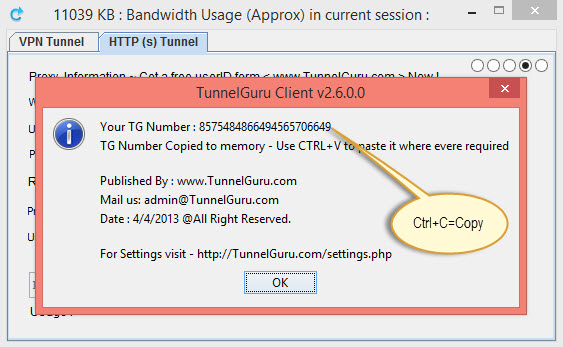
Kwnye Keyboard yako bofya CTRL+C ili ku-copy TG number
Baada ya hapo Login http://tunnelguru.com/account.php afu update TG number yako
hakikisha umejaza kwenye Box moja tu na hakikisha TG Client ipo Desktop usiamishe mpaka subscrption yako iishe

baada ya hapo rudi katika tunnel guru http tunnel yako,kama inavyoonekana katika picha hapo chini
.Press start Proxy and Press Ok for the messages that will Pop up and lastly it will say “SUCESSFUL..”
You may get errors but dont care Go ahead till it says successfully
NB:TO USE TUNNEL GURU FIRST YOU NEED TO BE CONNECTED TO YOUR MODEM INTERACE USING YOUR VODACOM SIMCARD
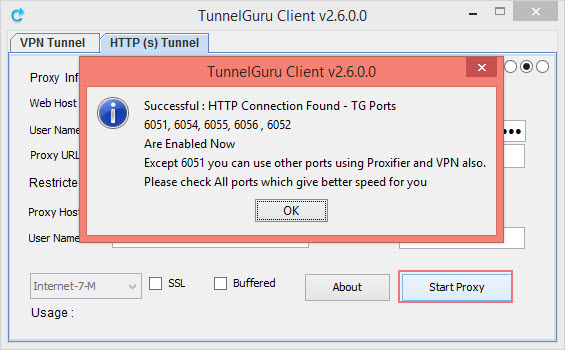
You are done now but the issue is that You will not be able to acess Internat Till you configure browser settings with Proxy server 127.0.0.1:6052 and Torrent clients use 127.0.0.1:6055
Here choose the easiest way for You
1.https://docs.google.com/document/d/1kcojTfls8R6JW4Xrl_Y3LlYCihf4tuo2dxtx-mDmzVo/edit?usp=sharing
2.Use proxy servers in each Application e.g Mozilla firefox
I advice you to use Mozilla Firefox for better results


then press ok make sure you follow these procedure properly any mistake in following these procedure will not enabling you access of the internet,fromthere you are done just enjoy intternet
Please be patient with This new Trick as we are looking for new settings
ANY PROBLEM CALL 0714061310
TRICK NUMBER 2:FOR THOSE WHO USE VPN ONLY, HTTP TUNNEL USERS NOT NEEDED HERE.
If you are using proxy host from Canada(70.38.42.93 or 70.38.42.92) then use canada 5 tcp
On use proxy you can alternatively use 127.0.0.1:6055
If you use VPN no need of proxifier or Setting up proxy servers in mozilla

STILL ANY PROBLEM JUST CALL 0714061310.
Subscribe to:
Comments (Atom)